Why Your AI Coding Tool Breaks at 20 Components (And How to Fix It)


From what I have observed, the first week of building a new application always feels like pure magic.
Initial builds flow smoothly using Cursor or Windsurf, but the entire system typically shatters around the 20-component mark.
We see this failure pattern constantly as product review and comparison experts.
The software suddenly starts hallucinating functions, ignoring established design systems, and breaking previously working code.
This exact transition from a small prototype to a larger codebase exposes the hard limits of artificial intelligence.
Our goal here is to share a helpful roadmap for solving this issue.
Let’s look at the data behind context windows, what it actually tells us, and explore a few practical ways to respond.
You will learn exactly why your AI coding tool breaks at 20 components (and how to fix it).
The Breaking Point: Why Your AI Coding Tool Breaks at 20 Components (And How to Fix It)
We track these exact breakdowns constantly during software evaluations. Developers often push out the first 15 components with perfect accuracy. The machine learning model understands the codebase, generates matching code, and executes flawlessly on the first try.
Our latest research into the Malaysian SaaS market highlights the urgency of this problem. The local digital economy is surging, backed by RM 163.6 billion in approved digital investments to accelerate the MyDIGITAL blueprint. Many local founders race to push out minimum viable products to capture this demand, only to hit this exact development wall.
We know this breakdown is not a bug in the software. The issue stems entirely from the context window limit, which stands as the single biggest obstacle to scaling a product. A larger codebase simply overwhelms the short-term memory of the engine.
“The transition from a 15-file MVP to a 50-file production application is the deadliest chasm for AI-assisted development.”
Our team hit this wall while testing three separate SaaS products earlier this year. Each instance required a complete development halt to restructure the codebase before progress could resume.

Why It Happens: The Context Window Explained
You must first understand how these models read information. Every AI coding tool features a context window, which acts as the working memory for the underlying system. Asking the tool to edit a file prompts it to load that specific document alongside relevant background information.
Our testing confirms a small project with 10 files allows the system to see most of your codebase at once. The model clearly understands component relationships, type definitions, database schemas, and API route structures. Scaling to 50 or more files restricts the model to seeing only a tiny fraction of your code.
We frequently observe the model generating components that import incorrectly named utility functions simply because it cannot see the actual utility file. The system must then make critical decisions based on incomplete information. It might create a database query referencing a column renamed three days ago, or duplicate logic already existing in a hidden file.
Our comparative data for 2026 shows how these practical limits vary heavily by tool and model. The popular Claude 3.5 Sonnet model processes up to 200,000 tokens of context, which equals about 300 pages of text. A typical React file of 200 lines consumes roughly 1,500 tokens.
| Project Element | Estimated Token Usage | Impact on Context Window |
|---|---|---|
| Core Next.js Setup | 15,000 tokens | Low |
| UI Component Library | 30,000 tokens | Medium |
| 40+ SaaS Files & Types | 120,000+ tokens | High (Nearing Limits) |
| 100+ Production Files | 300,000+ tokens | Critical (Exceeds Limits) |
We find that a typical production codebase quickly consumes this limit when factoring in type definitions, configuration files, and necessary dependencies. That massive 200,000 figure sounds impressive until your project grows.
The Five Symptoms
Our code audits reveal that you are hitting the context window limit when you spot specific patterns. Catching these errors early saves countless hours of debugging later. Watch for these distinct warning signs in your daily workflow:
- Phantom imports: The model imports Next.js or React functions that do not exist in your directory. The system retrieves memories from its general training data rather than reading your actual project files.
- Style inconsistency: New components stop matching your existing Tailwind CSS patterns. The tool generates forms with completely different padding and colours because it cannot read your base styling configuration.
- Duplicate logic: The software creates a new data-fetching utility that perfectly duplicates an existing one. The system simply missed the original file during the generation phase.
- Wrong TypeScript types: The generated code throws TS2304 compiler errors. The engine uses outdated or incomplete interface definitions because the real types are hidden in an unopened folder.
- Broken cross-file references: Modifying one file silently breaks a dependency elsewhere. The tool might rename a shared user function without updating the imports in the dashboard components.
Architecture Patterns That Prevent the Problem
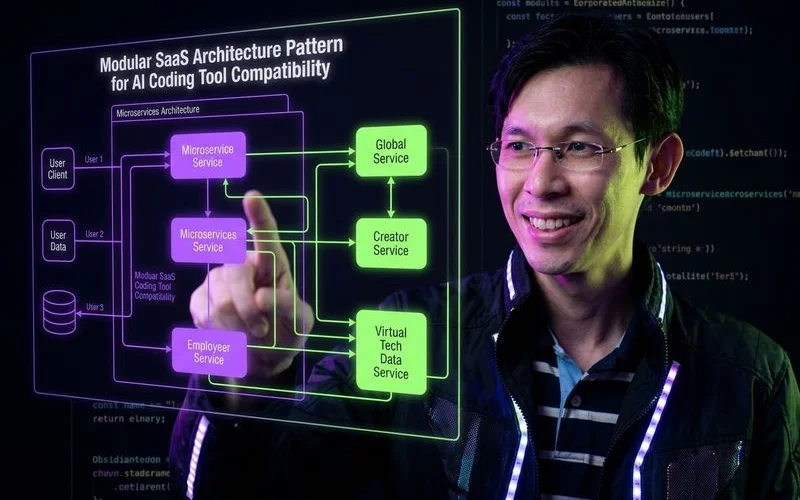
We have proven through extensive testing that the solution requires structuring your codebase strictly. The model needs significantly less context to make correct decisions when files are grouped logically. A larger token limit helps, but strict organisation provides a permanent fix.
Pattern 1: Self-Contained Module Architecture
Our top recommendation is moving away from organising files by technical type. Storing all components in one folder and all hooks in another creates massive context bloat. Developers should instead organise folders by feature using concepts like Feature-Sliced Design.
We see dramatic improvements when each feature module contains its own components, hooks, utilities, types, and API routes. Asking the software to modify the billing feature now requires it to scan only the billing module. The system ignores your authentication code, dashboard layouts, and notification triggers entirely.
Our own dedicated billing modules contain distinct, isolated elements. You will include specific components like PricingPage, dedicated hooks like useSubscription, and unique types like Invoice. This modular approach drastically reduces the token count for any single prompt.
Pattern 2: Strict Interface Boundaries
We always mandate clear TypeScript interfaces between modules during our architecture reviews. Module A and Module B must communicate through a strictly defined interface instead of reaching into each other’s internal logic. This prevents the machine from accidentally breaking unrelated features.
Our engineers strongly suggest using schema validation tools like Zod to enforce these boundaries. The model only needs to read the schema to generate perfect code. Enforcing strict schemas provides two major benefits:
- Context reduction: The system bypasses the need to read the neighbouring module.
- Error prevention: The AI cannot hallucinate invalid data shapes.
We consider this the most effective way to protect your core business logic.
Pattern 3: Co-Located Type Definitions
Keeping type definitions directly adjacent to the code that uses them is essential. Storing every interface in a massive, global types.ts file forces the tool to load irrelevant data constantly.
We observe that opening a specific feature module immediately provides the model with all necessary data shapes locally. The system avoids scanning a massive shared directory just to understand a simple text input. Aim to keep at least 80% of your TypeScript interfaces co-located within their specific feature folders.
Our only exception to this rule applies to shared types that genuinely cross multiple domains, such as a core User object.
Pattern 4: Explicit Configuration Over Convention
Machine learning models struggle severely with implicit conventions. Human developers learn undocumented team rules over time, but artificial intelligence requires explicit instructions.
“Artificial intelligence does not understand your undocumented team culture, so you must replace unspoken rules with hardcoded registries.”
We highlight in our research that you must make your codebase as explicit as possible to reduce costly errors. A strict route registry should clearly list every route, its exact path, the required method, and the expected data payloads. The Next.js App Router enforces some of this explicitly through required page.tsx and layout.tsx conventions.
Our standard practice involves creating index files that re-export components with crystal-clear names. This simple step minimises the guesswork required by the model.
Pattern 5: Documentation as Context
Our team considers creating a CLAUDE.md or CURSOR.md file at the root of your project an absolute necessity. These markdown files describe your precise architecture, naming rules, and critical design decisions. The software reads these documents automatically and uses them as a persistent baseline.
We include a 2,000-token markdown file in our standard project template. This document covers everything from database schema summaries to component creation rules. This single file functions as highly compressed context, acting as the working knowledge extracted from tens of thousands of lines of code.
Practical Workflow Adjustments
We rely on several specific workflow habits to maintain productivity as local projects scale up. Architecture handles the codebase, but daily habits dictate how effectively you prompt the engine. Adopt these routines to prevent sudden failures.
Give the AI Targeted Context
Our experts strongly advise against opening 15 random files before submitting a prompt. Open only the three or four files directly relevant to your immediate task and close everything else. This strict discipline forces the working memory to focus exclusively on the files that actually matter.
We recommend using the /Reference Open Editors command in Cursor to limit the model’s vision strictly. Windsurf utilises a massive 1-million token window for some models, but its internal compression often reduces effective context to around 150,000 tokens. You get much better results by explicitly naming the module in your prompt rather than relying on auto-detection.
Break Large Changes Into Small Steps
Our engineers never ask the tool to rewrite an entire authentication system in one prompt. Break massive refactoring jobs into a sequence of small, verifiable steps. Update the TypeScript interfaces first.
We move on to the API routes only after the types compile perfectly. Finish the process by updating the visual components. Committing to Git every 15 minutes during this process ensures you can easily revert if the model hallucinates.
Verify After Every Change
Our teams can trust the model’s output blindly on a tiny prototype, but large applications require constant verification. Test every single change locally before moving to the next prompt. A proper verification routine includes a few rapid steps:
- Run your local development server.
- Click through the affected pages manually.
- Confirm the terminal shows zero errors.
We find that catching a broken cross-file reference immediately saves hours of frustrating debugging later. Never merge AI-generated code without running it.
Use a Testing Strategy
Our automated test suites act as a mandatory safety net for context limitations. The model will inevitably make a change that breaks a hidden file, but a good test runner catches it instantly. Running tools like Vitest or Jest locally takes less than five seconds.
We always combine unit tests for individual modules with Playwright integration tests for user interfaces. This layered strategy provides the ultimate protection against silent failures.
Which Tools Handle Scale Best
Our comparative testing proves that not all platforms handle massive token loads equally. Choosing the right software dictates how smoothly your project will grow. Keep these 2026 platform distinctions in mind:
- Credit limits: Cursor relies on a credit pool based on model choice.
- Context handling: Windsurf compresses large windows heavily to save resources.
- Local access: Browser-based tools fail because they cannot index local files.
We evaluate Cursor as the premier option for projects exceeding 50 files. The platform switched to a credit-based system in mid-2025, where the $20 monthly Pro plan (roughly RM 78) provides a pool of credits equal to about 225 Claude 3.5 Sonnet requests. It handles massive repositories exceptionally well thanks to an aggressive local indexing feature that scans your entire hard drive directory accurately.
Our data shows Windsurf performs beautifully on medium-sized applications. The Pro plan costs $15 monthly (roughly RM 58) and includes around 1,000 prompts with unlimited tab completions. The proprietary Cascade engine detects context well initially but begins dropping information around the 40-file mark due to aggressive context compression.
We avoid relying on browser-based generation tools for large production apps. Strict memory limits and the inability to index local files make them unsuitable for scaling beyond 20 components.
The Scaling Mindset
Our final piece of advice centres on your mental approach to development. Prototyping feels magical because you simply type a description and watch the application appear. Scaling a real product feels much more like pair programming with a brilliant but highly forgetful junior developer.
“Treat your AI assistant like a junior developer, it needs explicit instructions, limited scope, and constant verification.”
We must actively provide the right files, verify every output, and write explicit instructions. This shift does not represent a failure of the current technology. Human developers cannot keep 50,000 lines of logic perfectly memorised either.
Our most successful founders utilise strict folder structures and rigorous testing to manage this growing codebase. Adopting these exact same strategies ensures your application scales successfully. Structure your folders properly, limit your prompts to specific tasks, and test every generation.
We guarantee that these foundational habits help you understand exactly why your AI coding tool breaks at 20 components (and how to fix it). Review your architecture today and read our complete roundup of AI coding tools for SaaS to find the right platform for your next scalable project. Start refactoring your largest folder today to prevent future roadblocks.

Adam Yong
Founder & Lead Builder
SaaS builder running 3 live products. Reviews tools by building real SaaS features with them.